A company develops a Power Apps canvas app. The app logs events and performs data operations.
You review the following Power Fx formula used during application execution.
Exhibit:
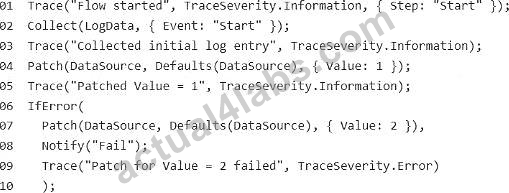
You need to determine how the formula behaves during execution.
Evaluate the following statements:
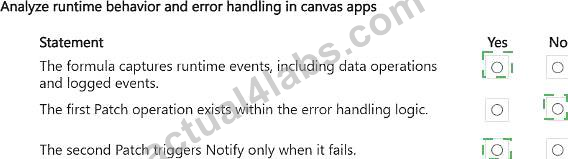
1. The formula captures runtime events, including data operations and logged events.
2. The first Patch operation exists within the error-handling logic.
3. The second Patch operation triggers Notify only when it fails.
For each statement, select Yes if the statement is true. Otherwise, select No.
Exhibit:

Reveal Solution
Discussion
Correct Answer:
Explanation:
Statement 1 - Yes; Statement 2 - No; Statement 3 - Yes.
Power Fx provides functions for capturing diagnostic information, modifying data, and handling runtime errors in canvas applications. The Trace function records custom diagnostic events that can be examined through Power Apps Live Monitor or supported telemetry integrations. Collect adds records to a collection, while Patch creates or modifies records in a data source. The first Patch operation is executed before the IfError expression and therefore is not directly protected by that error-handling block. The second Patch operation is executed within IfError, which evaluates whether the operation produces an error. If the operation fails, the associated Notify function displays a message to the user. The formula also uses Trace to record execution information. Combining these functions supports troubleshooting, controlled error handling, and improved application reliability.

 $89.98
57%OFF
$89.98
57%OFF


 1594 Customer Reviews


 0
0
 0
0
 0
0
 0
0
