

NCP-CN Questions Prepare with Learning Information! 2026 Regularly updated
Get NCP-CN Products Practice Material for NCP-CN Exam Question Preparation
Nutanix NCP-CN Exam Syllabus Topics:
| Topic | Details |
|---|---|
| Topic 1 |
|
| Topic 2 |
|
| Topic 3 |
|
| Topic 4 |
|
NEW QUESTION # 48
There is a private registry for the NKP deployment and the company has an NKP Ultimate license. A Platform Engineer is using the Podman tool and is already logged in. Now, the engineer needs to send the private registry with the NKP Catalog Applications.
What command should the engineer use?
- A. nkp apply bundle -f ./container-images/nkp/catalog-applications-image-bundle-v2.12.0.tar --to- registry=${REGISTRY_URL} --to-registry-username=${REGISTRY_USERNAME} --to-registry- password=${REGISTRY_PASSWORD}
- B. nkp push bundle --bundle ./container-images/nkp/catalog-applications-image-bundle-v2.12.0.tar --to- registry=${REGISTRY_URL} --to-registry-username=${REGISTRY_USERNAME} --to-registry- password=${REGISTRY_PASSWORD}
- C. podman load -i ./container-images/nkp/catalog-applications-image-bundle-v2.12.0.tar
- D. docker load -i ./container-images/nkp/catalog-applications-image-bundle-v2.12.0.tar
Answer: B
Explanation:
To push the NKP Catalog Applications image bundle to a private registry, the official nkp push bundle command must be used with the specified parameters to authenticate and push the bundle to the registry.
Exact extract:
"Use the nkp push bundle command to upload the NKP catalog applications image bundle to the specified private registry, ensuring secure and complete image upload." Reference:
Nutanix Kubernetes Platform Administration (NKPA) 6.10 - "Pushing Catalog Applications to Private Registries" NCP-CN 6.10 Study Guide - "Private Registry Integration for NKP"
NEW QUESTION # 49
A Platform Engineer will be deploying an NKP cluster in a dark site with no Internet access. The Cloud Administrator has provided a Linux VM for this purpose, so the engineer needs to prepare this VM to be used as a bastion host. Which two actions should the engineer take to complete this task? (Choose two.)
- A. Install LDAP Server.
- B. Get or create SSH Keys.
- C. Install Docker.
- D. Enable NTP Service.
Answer: B,D
Explanation:
A bastion host in a dark site environment serves as a secure entry point for managing the NKP deployment, providing access to the cluster infrastructure without direct Internet connectivity. The NKPA course outlines the prerequisites for preparing a Linux VM as a bastion host, focusing on secure access and time synchronization, which are critical for air-gapped Kubernetes deployments.
* Get or create SSH Keys (Option B):The bastion host requires SSH keys to enable secure, passwordless access to the NKP cluster nodes and other infrastructure components (e.g., Nutanix AHV hosts). The NKPA course specifies that SSH keys must be generated or obtained and configured on the bastion host to facilitate secure communication during deployment and management tasks. The Nutanix Cloud Native (NCP-CN) 6.10 Study Guide states: "For a bastion host in an NKP dark site deployment, ensure SSH keys are created or obtained to enable secure access to cluster nodes and infrastructure." The engineer can generate SSH keys using ssh-keygen and distribute the public key to the target systems.
* Enable NTP Service (Option D):Time synchronization is essential in Kubernetes clusters to ensure consistent logging, certificate management, and scheduling. In a dark site with no Internet access, the bastion host must be configured to synchronize time with an internal NTP (Network Time Protocol) server or act as an NTP server itself. The NKPA course emphasizes enabling the NTP service on the bastion host to maintain accurate time across the air-gapped environment. The NCP-CN 6.10 Study Guide notes: "Enable the NTP service on the bastion host to ensure time synchronization in a dark site NKP deployment, as Kubernetes requires accurate time for proper operation." The engineer can enable NTP using commands like systemctl enable ntpd and configure it to use an internal time source.
Incorrect Options:
* A. Install LDAP Server: LDAP is used for centralized authentication, but it is not a requirement for a bastion host in an NKP dark site deployment. The course focuses on SSH access instead.
* C. Install Docker: While Docker is needed on Kubernetes nodes for container runtimes, the bastion host's role is to provide secure access and management, not to run containers.
:
Nutanix Kubernetes Platform Administration (NKPA) Course, Section on Preparing for Dark Site Deployments.
Nutanix Cloud Native (NCP-CN) 6.10 Study Guide, Chapter on NKP Deployment Prerequisites.
Nutanix Cloud Bible, NutanixKubernetesPlatform Section: https://www.nutanixbible.com
NEW QUESTION # 50
When deploying an NKP cluster onto air-gapped, pre-provisioned servers, Konvoy Image Builder is utilized to prepare the servers to become NKP cluster nodes.
What does the konvoy-image upload command do as a part of this preparation process?
- A. The command uploads artifacts to the servers such as the container runtime, the OS bundle, and Kubernetes components, including optional OS hardening scripts (must be client supplied).
- B. The command is used to create a konvoy userid on the servers, as well as upload artifacts to them such as the container runtime, the OS bundle, and Kubernetes components.
- C. The command is used to upload OS hardening scripts to the server (must be client supplied).
- D. The command uploads artifacts to the servers such as the container runtime, the OS bundle, and Kubernetes components.
Answer: D
NEW QUESTION # 51
A Platform Engineer needs to create an NKP custom image for vSphere.
Which option should the engineer use?
- A. Konvoy Image Builder
- B. Hashicorp Packer
- C. Nutanix Image Builder
- D. RedHat Satellite
Answer: A
NEW QUESTION # 52 
The cluster arca will host a new application that needs to add more workers. The company cannot get more NKP licenses, so it has decided to delete the demo cluster and add the required workers to the arca cluster. How should the engineer delete the demo cluster from this UI?
- A. Login with SSH to the kommander cluster and execute kubectl delete cluster -c demo
- B. Press the ("demo" cluster line) three-dot menu at the right and select Detach. Then ask the cluster owner to delete the cluster.
- C. Press the ("demo" cluster line) three-dot menu at the right and select Delete.
- D. Press the ("demo" cluster line) three-dot menu at the right and select Download kubeconfig, then use that file to execute kubectl delete cluster -c demo --kubeconfig=demo.conf
Answer: C
NEW QUESTION # 53
A Platform Engineer has a requirement for backup and recovery and would like to leverage an Out-Of-The- Box solution distributed with NKP. What is the backup and recovery solution distributed for NKP?
- A. Velero
- B. Nutanix Snapshot
- C. Kasten
- D. Tar
Answer: A
Explanation:
The NKPA 6.10 documentation confirms that Velero is the built-in backup and recovery solution provided as part of the NKP platform. It provides cluster-level and namespace-level backup, restore, and migration capabilities.
Exact extract from the documentation:
"Velero is the integrated, out-of-the-box backup and restore solution in NKP. It supports scheduled backups, disaster recovery, and application migration workflows." Reference:
Nutanix Kubernetes Platform Administration (NKPA) 6.10 - "Velero Backup and Recovery Integration" NCP-CN 6.10 Study Guide - "Backup and Restore Solutions in NKP"
NEW QUESTION # 54
A Platform Engineer works for a service provider and needs to establish access and authentication for multiple clients into an NKP cluster. Each client has their own LDAP source that should be used for authentication into the cluster.
How would this be accomplished?
- A. An NKP workspace needs to be created for each client and an LDAP connector would be created for each NKP workspace.
- B. A common LDAP source needs to be established and client specific groups and users need to be configured within this common LDAP provider. Then an LDAP connector would be created for this LDAP provider.
- C. An NKP project would be created for each client and an LDAP connector would be created for each NKP project. Users would provide the project name their company was assigned as part of their login.
- D. The LDAP connector configuration would be modified to include an array for each client LDAP source to authenticate with. Users would provide the client name defined in the array as part of their login.
Answer: A
Explanation:
NKPA 6.10 recommends leveraging workspaces to isolate different tenants (clients) in a multi-tenant environment. LDAP connectors can be scoped to individual workspaces, allowing separate authentication and RBAC configurations per client.
Key reference from documentation:
"In multi-tenant scenarios, create a dedicated workspace for each tenant and configure a unique LDAP connector within that workspace to integrate their identity source." Reference:
Nutanix Kubernetes Platform Administration (NKPA) 6.10 - "Multi-tenancy with Workspaces and LDAP" NCP-CN 6.10 Study Guide - "Managing Multiple LDAP Connectors in Workspaces"
=======
NEW QUESTION # 55 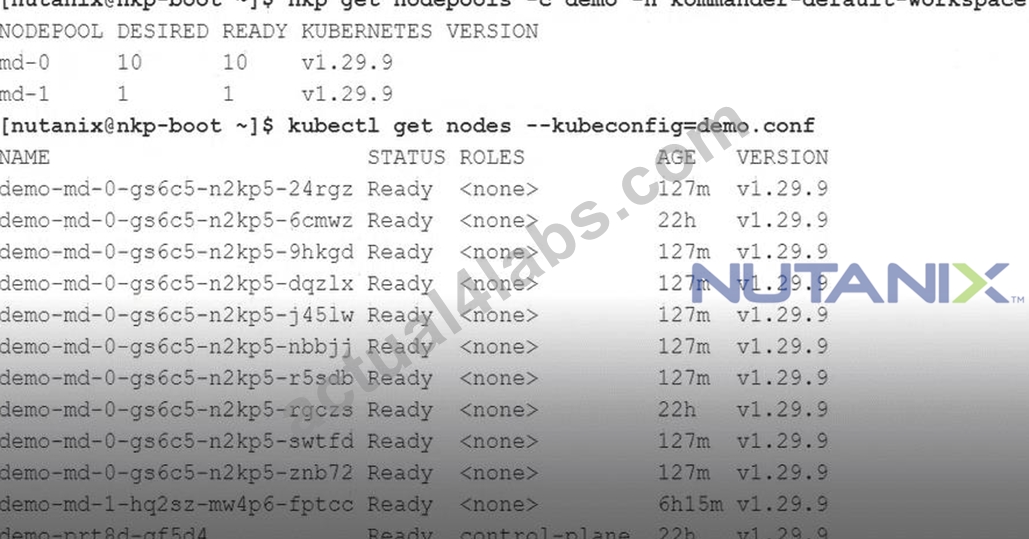
Looking at the nodepools for the Kubernetes cluster named demo, there is a node pool named md-1 with only one worker. This worker should be deleted along with the node pool md-1.
How should this task be accomplished?
- A. Run acli vm.delete demo-md-1-hQ2sz-mw4p6-fptc
- B. Run nkp node scale nodepool md-1 --replicas=0 --cluster-name=demo
- C. Run ncli vm.delete demo-md-1-hQ2sz-mw4p6-fptc
- D. Run nkp delete nodepool md-1 --cluster-name=demo
Answer: D
NEW QUESTION # 56
A Kubernetes administrator needs to deploy a new NKP deployment for a DR Datacenter. Cluster information:
AOS 6.10
Hypervisor is AHV
Six NX-8170-G9 NodesWhich command should the administrator use to invoke the prompt-based CLI deployment method?
- A. nkp create cluster ahv
- B. nkp create cluster nutanix
- C. nkp create nodepool nutanix
- D. nkp install kommander
Answer: A
NEW QUESTION # 57
A Platform Engineer has deployed NKP and wants to utilize its OOB data storage feature.
What should the engineer enable to support backups within the NKP environment?
- A. MinIO
- B. Rook Ceph
- C. Volumes iSCSI
- D. Objects S3
Answer: B
NEW QUESTION # 58
A company uses an Artifactory private registry for development. The NKP deployment must use this private registry since the Security Administrator has the firewall configured to reject connections to public container registries. The first task is to push the NKP bundle to this private registry.
What options should be used to push the NKP bundle to this private registry?
- A. --to-registry, --to-registry-username and --to-registry-password
- B. --mirror-url, --mirror-username and --mirror-password
- C. --registry-url, --registry-username and --registry-password
- D. --registry-mirror-url, --registry-mirror-username and --registry-mirror-password
Answer: A
Explanation:
When mirroring the NKP bundle to a private registry, the recommended method is to use the nkp bundle push or similar commands with the --to-registry option, specifying the target registry along with the credentials (-- to-registry-username and --to-registry-password).
Key reference from documentation:
"Use the --to-registry flag along with --to-registry-username and --to-registry-password to push the NKP bundle to a private registry." Reference:
Nutanix Kubernetes Platform Administration (NKPA) 6.10 - "Pushing NKP Bundles to a Private Registry" NCP-CN 6.10 Study Guide - "Registry Mirroring for NKP"
=======
NEW QUESTION # 59
A Platform Engineer is preparing machine images for NKP through the NIB or KIB process. What is the purpose of doing this?
- A. Creating a custom user account for NKP admins to ensure access to NKP nodes
- B. Creating a CAPI-compliant image for use as NKP cluster nodes
- C. Hardening an OS image with client-supplied hardening scripts
- D. Tagging the image to be used specifically for NKP
Answer: B
Explanation:
The Nutanix Kubernetes Platform (NKP) leverages Cluster API (CAPI) to manage the lifecycle of Kubernetes clusters. When preparing machine images for NKP deployment, the Nutanix Image Builder (NIB) or Kubernetes Image Builder (KIB) process is used to create custom machine images that are compatible with NKP's infrastructure requirements. According to the NKPA course, the primary purpose of this process is to create CAPI-compliant images that can be used as the base for NKP cluster nodes.
The NKPA course explains that NKP uses CAPI to provision and manage Kubernetes clusters, and CAPI requires machine images that meet specific criteria, such as including the necessary Kubernetes components, container runtimes, and operating system configurations. The NIB/KIB process ensures that the images are pre-configured with these components, making them suitable for use as NKP worker and control plane nodes.
The Nutanix Cloud Native (NCP-CN) 6.10 Study Guide states: "The Nutanix Image Builder (NIB) or Kubernetes Image Builder (KIB) is used to create CAPI-compliant machine images that include the required OS, Kubernetes binaries, and dependencies for NKP cluster nodes." These images are typically based on supported operating systems like Rocky Linux or Ubuntu, as provided by Nutanix, and are customized to include the container runtime (e.g., containerd), kubeadm, and other dependencies required for CAPI-based cluster provisioning. The resulting images are stored in a location accessible to the NKP deployment process, such as a local registry or Nutanix Prism Central.
Incorrect Options:
* A. Hardening an OS image with client-supplied hardening scripts: While hardening the OS is a good practice, it is not the primary purpose of the NIB/KIB process. The NKPA course notes that hardening can be applied as part of image customization, but the core goal is to ensure CAPI compliance, not just hardening.
* B. Creating a custom user account for NKP admins to ensure access to NKP nodes: The NIB/KIB process does not focus on creating user accounts. User access is managed through Kubernetes RBAC or external identity providers, as covered in the NKPA course's authentication section.
* C. Tagging the image to be used specifically for NKP: Tagging may occur as part of image management, but it is not the primary purpose. The NKPA course emphasizes CAPI compliance over tagging.
:
Nutanix Kubernetes Platform Administration (NKPA) Course, Section on Preparing Machine Images.
Nutanix Cloud Native (NCP-CN) 6.10 Study Guide, Chapter on NKP Deployment Prerequisites.
Nutanix Cloud Bible, NutanixKubernetesPlatform Section: https://www.nutanixbible.com Cluster API Documentation: https://cluster-api.sigs.k8s.io
NEW QUESTION # 60
A Platform Engineer for an organization needs to deploy NKP into AWS while using custom credentials for authenticating. Which flag should the engineer use when starting to bootstrap the cluster installation?
- A. --cloud-credentials=<my-profile><br>
- B. --with-aws-bootstrap-credentials=true<br>
- C. --aws-access-key=<aws access="" key=""> --aws-secret-key=<aws secret="" key=""></aws></aws></my-profile></my-profile>
- D. --aws-profile=<my-profile><br>
Answer: D
NEW QUESTION # 61
When deploying an NKP cluster onto air-gapped, pre-provisioned servers, Konvoy Image Builder is utilized to prepare the servers to become NKP cluster nodes.
What does the konvoy-image upload command do as a part of this preparation process?
- A. The command uploads artifacts to the servers such as the container runtime, the OS bundle, and Kubernetes components, including optional OS hardening scripts (must be client supplied).
- B. The command is used to create a konvoy userid on the servers, as well as upload artifacts to them such as the container runtime, the OS bundle, and Kubernetes components.
- C. The command is used to upload OS hardening scripts to the server (must be client supplied).
- D. The command uploads artifacts to the servers such as the container runtime, the OS bundle, and Kubernetes components.
Answer: D
Explanation:
According to the NKPA 6.10 documentation under "Air-Gapped Preparation with Konvoy Image Builder," the konvoy-image upload command uploads essential artifacts to the target servers to prepare them to serve as cluster nodes. These artifacts include:
* Container runtime (containerd)
* OS bundle
* Kubernetes components
It does not involve user creation or OS hardening scripts (those are separate, client-driven processes).
Key reference from documentation:
"The konvoy-image upload command uploads the required artifacts to the target server(s) to prepare them for Kubernetes deployment in air-gapped environments. This includes the container runtime, OS bundle, and Kubernetes binaries." Reference:
Nutanix Kubernetes Platform Administration (NKPA) 6.10 - "Air-Gapped Deployment Preparation" NCP-CN 6.10 Study Guide - "Konvoy Image Builder Workflow"
NEW QUESTION # 62
An administrator has been trying to deploy an initial AHV-based NKP cluster in a dark site (no Internet connectivity) environment using the command shown in the question.
nkp create cluster nutanix \
--cluster-name=$CLUSTER_NAME \
--control-plane-prism-element-cluster=$PE_NAME \
--worker-prism-element-cluster=$PE_NAME \
--control-plane-subnets=$SUBNET_ASSOCIATED_WITH_PE \
--worker-subnets=$SUBNET_ASSOCIATED_WITH_PE \
--control-plane-endpoint-ip=$AVAILABLE_IP_FROM_SAME_SUBNET \
--csi-storage-container=$NAME_OF_YOUR_STORAGE_CONTAINER \
--endpoint=$PC_ENDPOINT_URL \
--control-plane-vm-image=$NAME_OF_OS_IMAGE_CREATED_BY_NKP_CLI \
--worker-vm-image=$NAME_OF_OS_IMAGE_CREATED_BY_NKP_CLI \
--registry-url=${REGISTRY_URL} \
--registry-mirror-username=${REGISTRY_USERNAME} \
--registry-mirror-password=${REGISTRY_PASSWORD} \
--kubernetes-service-load-balancer-ip-range $START_IP-$END_IP \
--self-managed
Which missing attribute needs to be added in order for the deployment?
- A. --registry-url
- B. --registry-username
- C. --insecure
- D. --airgapped
Answer: D
Explanation:
For deployments in air-gapped environments where there is no external Internet connectivity, the --airgapped parameter is required. This instructs the NKP deployment to rely solely on internal resources, using pre- staged images and local container registries, ensuring that no external network dependencies cause deployment failures.
References: Nutanix Kubernetes Platform Administration Guide - Air-gapped Cluster Deployment Requirements
NEW QUESTION # 63
What is a prerequisite for upgrading an NKP license to Ultimate?
- A. Size the Control Plane nodes appropriately to support the installation of default platform services.
- B. Size the ETCD nodes appropriately to support the installation of default platform services.
- C. Size the Worker nodes appropriately to support the installation of default platform services.
- D. Size the Sidecar containers appropriately to support the installation of default platform services.
Answer: A
NEW QUESTION # 64
A company has 30 Edge devices with lightweight Kubernetes, and developers need to push the application to every edge device. An NKP administrator has the NKP Ultimate license tier configured and has access to all kubeconfig files for the 30 edge devices. What is the most efficient way that the administrator can lifecycle manage the application deployments?
- A. Create a script to automate the deployment to every edge device.
- B. Create a new Workspace and attach the 30 edge devices to this workspace with Attach Cluster.
- C. Create a GitHub configuration, deploy it to the 30 edge devices, and configure them to use a GitHub account.
- D. Ask the developers to delete the lightweight Kubernetes and deploy new Kubernetes clusters with NKP.
Answer: B
Explanation:
The NKPA course emphasizes that NKP's fleet management capabilities allow administrators to manage multiple Kubernetes clusters, including lightweight clusters on edge devices, by attaching them to an NKP workspace. With the NKP Ultimate license tier, the administrator has access to advanced fleet management features, including GitOps-based application deployment across attached clusters.
The most efficient way to lifecycle manage application deployments across the 30 edge devices is to create a new workspace and attach the 30 edge devices to this workspace using the Attach Cluster functionality (Option D). Once attached, NKP can use GitOps (via Flux) to push applications to all clusters in the workspace simultaneously, ensuring consistent deployment and lifecycle management. The Nutanix Cloud Native (NCP-CN) 6.10 Study Guide states: "For managing edge devices with lightweight Kubernetes, attach the clusters to an NKP workspace using the Attach Cluster feature, enabling centralized application deployment and lifecycle management via GitOps." The administrator can use the kubeconfig files to attach each cluster via the NKP UI or CLI (e.g., nkp attach cluster).
Incorrect Options:
* A. Create a GitHub configuration for each device: This is manual and inefficient compared to NKP's centralized GitOps management.
* B. Create a script to automate deployment: Scripting is error-prone and lacks NKP's built-in fleet management capabilities.
* C. Delete lightweight Kubernetes and deploy new clusters: This is unnecessary, as NKP can manage existing clusters, including lightweight ones.
:
Nutanix Kubernetes Platform Administration (NKPA) Course, Section on Fleet Management.
Nutanix Cloud Native (NCP-CN) 6.10 Study Guide, Chapter on Attaching Clusters.
Nutanix Cloud Bible, NutanixKubernetesPlatform Section: https://www.nutanixbible.com
NEW QUESTION # 65
After loading the NKP bundles to a private registry in an air-gapped environment, a Platform Engineer now needs the Konvoy bootstrap image to create the bootstrap cluster. The Konvoy image has not been loaded into the registry. Which is the most viable command to load the Konvoy bootstrap image on the bastion host?
- A. docker image tag konvoy-bootstrap-image-<version>.tar version docker.io/konvoy-bootstrap version
- B. nkp push bundle --bundle konvoy-bootstrap-image-<version>.tar --to-registry=<REGISTRY_URL>
- C. docker load -i konvoy-bootstrap-image-<version>.tar
- D. nkp load image -f konvoy-bootstrap-image-<version>.tar --to-registry=<REGISTRY_URL>
Answer: C
NEW QUESTION # 66
A Platform Engineer needs to do an air-gapped installation of NKP. This environment needs to run without Internet access and be fully operational, including updates. Docker has been installed, and the NKP bundle exists on a bastion host. What is the first command that the engineer must run to begin the process?
- A. tar -xzvf nkp-air-gapped-bundle_v2.12.0_linux_amd64.tar.gz
- B. nkp create cluster nutanix
- C. docker load -i konvoy-bootstrap-image-v2.12.0.tar
- D. nkp push bundle --bundle
Answer: A
Explanation:
In an air-gapped NKP installation, the engineer starts with the NKP Air-Gapped Bundle, a tarball containing all necessary components (e.g., container images, binaries, configuration files) for deployment without Internet access. The NKPA course specifies that the first step is to extract this bundle on the bastion host to make its contents available for the installation process. The correct command is tar -xzvf nkp-air-gapped- bundle_v2.12.0_linux_amd64.tar.gz, which extracts the bundle into a directory, revealing the container images, CLI tools, and other resources needed for the deployment.
The Nutanix Cloud Native (NCP-CN) 6.10 Study Guide states: "To begin an air-gapped NKP installation, first extract the NKP Air-Gapped Bundle using tar -xzvf <bundle-file>.tar.gz on the bastion host to access the installation artifacts." After extraction, the engineer can proceed with loading container images (e.g., using docker load) and running NKP CLI commands to deploy the cluster, ensuring all dependencies are available locally.
Incorrect Options:
* A. nkp push bundle --bundle: This is not a valid command. The bundle must be extracted before its contents can be used.
* B. docker load -i konvoy-bootstrap-image-v2.12.0.tar: Loading the bootstrap image is a subsequent step after extracting the bundle, which contains this image tarball.
* D. nkp create cluster nutanix: This command creates a cluster but cannot be run until the bundle is extracted and its images are loaded.
:
Nutanix Kubernetes Platform Administration (NKPA) Course, Section on Air-Gapped Installations.
Nutanix Cloud Native (NCP-CN) 6.10 Study Guide, Chapter on NKP Deployment Prerequisites.
Nutanix Cloud Bible, NutanixKubernetesPlatform Section: https://www.nutanixbible.com
NEW QUESTION # 67
Which option is enabled with the NKP Pro licensing tier?
- A. AI OPS
- B. Kubernetes Dashboard
- C. Insights
- D. Fleet Management
Answer: D
Explanation:
Comprehensive and Detailed Explanation:
The NKP Pro licensing tier includes Fleet Management, which enables centralized lifecycle management of multiple Kubernetes clusters. This feature is critical for managing larger environments, providing visibility and control over fleet-wide configurations and updates. Other features, like AI OPS and advanced observability, are typically associated with higher tiers (e.g., Ultimate).
References: Nutanix Licensing and Features Matrix
NEW QUESTION # 68
A Platform Engineer would like to deploy an NKP Platform Application to all the clusters within an NKP workspace from the command line. What is the command set to use, and what parameters must be specified with it?
- A. The nkp deploy app command set would be utilized. The application ID, as well as the NKP workspace of the clusters, must be provided.
- B. The nkp create appdeployment command set would be utilized. The application ID & version, as well as the NKP workspace of the clusters, must be provided.
- C. The kubectl create appdeployment command set would be utilized. The application ID, as well as the NKP workspace of the clusters, must be provided.
- D. The nkp deploy platform-app command set would be utilized. The application ID, as well as the NKP workspace of the clusters, must be provided.
Answer: B
Explanation:
NKP Platform Applications (e.g., Rook Ceph, Prometheus, Fluent Bit) are pre-integrated tools that can be deployed to Kubernetes clusters within a workspace to provide services like storage, monitoring, and logging.
The NKPA course specifies that to deploy a platform application to all clusters in a workspace from the command line, the engineer uses the nkp create appdeployment command. This command creates an application deployment resource that targets the specified workspace and clusters.
The required parameters include the application ID (to identify the platform application), the version (to specify the desired version of the application), and the NKP workspace (to define the scope of clusters). For example: nkp create appdeployment --app-id prometheus --version 2.30.0 --workspace fin-vd. The Nutanix Cloud Native (NCP-CN) 6.10 Study Guide states: "Use the nkp create appdeployment command to deploy platform applications, specifying the application ID, version, and target workspace to apply the deployment across all clusters in that workspace." Incorrect Options:
* B. nkp deploy platform-app: This is not a valid NKP command. The correct command is nkp create appdeployment.
* C. nkp deploy app: This is not a recognized command in the NKPA documentation.
* D. kubectl create appdeployment: kubectl interacts with Kubernetes resources, not NKP-specific platform applications.
:
Nutanix Kubernetes Platform Administration (NKPA) Course, Section on Platform Application Deployment.
Nutanix Cloud Native (NCP-CN) 6.10 Study Guide, Chapter on Day 2 Operations.
Nutanix Cloud Bible, NutanixKubernetesPlatform Section: https://www.nutanixbible.com
NEW QUESTION # 69
A developer asked a Platform Engineer to review a deployment in the cluster called iot-1 in the workspace iot- plant-3, but the engineer does not have the kubeconfig file. Which command is valid for generating the kubeconfig file to review the Kubernetes cluster?
- A. kubectl get kubeconfig --cluster-name=iot-1 -w iot-plant-3 > iot-1.conf
- B. nkp get kubeconfig -c iot-1 -w iot-plant-3 > iot-1.conf
- C. nkp get configmaps -n iot-plant-3 -c iot-1 > iot-1.conf
- D. kubectl get secret iot-1 -n kommander > iot-1.conf
Answer: B
Explanation:
The NKPA course explains that to access a Kubernetes cluster managed by NKP, such as iot-1 in the workspace iot-plant-3, a kubeconfig file is required to authenticate and interact with the cluster's API server.
If the kubeconfig file is missing, the engineer can generate it using the NKP CLI. The correct command is nkp get kubeconfig -c iot-1 -w iot-plant-3 > iot-1.conf (Option B).
This command retrieves the kubeconfig for the specified cluster (-c iot-1) in the specified workspace (-w iot- plant-3) and redirects the output to a file named iot-1.conf. The engineer can then use this kubeconfig file with kubectl (e.g., kubectl --kubeconfig=iot-1.conf get pods) to review the deployment. The Nutanix Cloud Native (NCP-CN) 6.10 Study Guide states: "To generate a kubeconfig file for an NKP-managed cluster, use nkp get kubeconfig -c <cluster-name> -w <workspace-name>, which retrieves the necessary credentials for cluster access." Incorrect Options:
* A. kubectl get kubeconfig: kubectl does not have a get kubeconfig subcommand, and it cannot generate kubeconfig files for NKP clusters.
* C. kubectl get secret iot-1 -n kommander: While secrets in the kommander namespace may store credentials, this command does not format them as a kubeconfig file.
* D. nkp get configmaps: This is not a valid command for retrieving kubeconfig files; ConfigMaps do not store kubeconfig data in this context.
:
Nutanix Kubernetes Platform Administration (NKPA) Course, Section on Cluster Access Management.
Nutanix Cloud Native (NCP-CN) 6.10 Study Guide, Chapter on Day 2 Operations.
Nutanix Cloud Bible, NutanixKubernetesPlatform Section: https://www.nutanixbible.com
NEW QUESTION # 70
Recently, the reliability of some developer platforms has been impacted by out-of-memory errors, causing pods to crash and then remain in a pending state. A Cloud Engineer has been tasked with collecting and reviewing centralized metrics across the various platform environments to identify differences between them and better understand what is causing these performance issues. What should the engineer do to address this request?
- A. Utilize Prometheus to collect and present centralized metrics on NKP attached and managed clusters.
Then configure Thanos Query to monitor and send out alerts based on the metric thresholds that have been configured within it. - B. Utilize Fluentd and Fluent Bit to collect and present centralized metrics on NKP attached and managed clusters. Then visualize these collected and centralized metrics in Grafana.
- C. Utilize Fluentd and Fluent Bit to collect and present centralized metrics on NKP attached and managed clusters. Then configure Thanos Query to monitor and send out alerts based on the metric thresholds that have been configured within it.
- D. Utilize Thanos to collect and present centralized metrics on NKP attached and managed clusters. Then visualize these collected and centralized metrics in Grafana.
Answer: A
Explanation:
The NKPA course details NKP's monitoring stack for collecting and analyzing metrics across attached and managed clusters, which is critical for troubleshooting issues like out-of-memory errors. The engineer needs to collect centralized metrics and set up alerting to identify performance issues. The correct approach is to use Prometheus for metrics collection and Thanos Query for alerting (Option C).
* Utilize Prometheus to collect and present centralized metrics on NKP attached and managed clusters: Prometheus is NKP's default metrics collection tool, deployed as a platform application. It scrapes metrics (e.g., CPU, memory usage) from nodes, pods, and services across all clusters in a workspace, centralizing them for analysis. The Nutanix Cloud Native (NCP-CN) 6.10 Study Guide states: "Prometheus is used in NKP to collect and present centralized metrics from attached and managed clusters, enabling detailed performance analysis." This is ideal for identifying differences in memory usage causing the out-of-memory errors.
* Configure Thanos Query to monitor and send out alerts based on the metric thresholds that have been configured within it: Thanos Query, part of NKP's monitoring stack, aggregates Prometheus metrics across clusters and provides a unified query interface. It also integrates with Alertmanager to send alerts based on configured thresholds (e.g., memory usage > 90%). The NKPA course notes: "Use Thanos Query to monitor metrics across NKP clusters and configure alerts with Alertmanager to notify engineers of performance issues like out-of-memory errors." This setup helps the engineer proactively address the issue.
Incorrect Options:
* A & B. Utilize Fluentd and Fluent Bit: Fluentd and Fluent Bit are logging tools in NKP, used for collecting logs, not metrics. Metrics collection requires Prometheus.
* D. Utilize Thanos to collect and present centralized metrics: Thanos does not collect metrics directly; it extends Prometheus by providing long-term storage and query aggregation. Prometheus is the primary collection tool.
:
Nutanix Kubernetes Platform Administration (NKPA) Course, Section on Monitoring and Metrics.
Nutanix Cloud Native (NCP-CN) 6.10 Study Guide, Chapter on Day 2 Operations.
Nutanix Cloud Bible, NutanixKubernetesPlatform Section: https://www.nutanixbible.com Prometheus Documentation: https://prometheus.io Thanos Documentation: https://thanos.io
NEW QUESTION # 71
......
Most Reliable Nutanix NCP-CN Training Materials: https://www.actual4labs.com/Nutanix/NCP-CN-actual-exam-dumps.html
The Realest Study Materials NCP-CN Dumps: https://drive.google.com/open?id=1OsKAqX1viagEt1ZanHF3ac8JyviCEpXk