

Network Appliance NS0-593 Exam Dumps - PDF Questions and Testing Engine
Latest NS0-593 Exam Dumps for Pass Guaranteed
NEW QUESTION # 17
You created a new NetApp ONTAP FlexGroup volume spanning six nodes and 12 aggregates with a total size
of 4 TB. You added millions of files to the FlexGroup volume with a flat directory structure totaling 2 TB, and
you receive anout of apace error message on your host.
What would cause this error?
- A. The maximum number of volume constituents has been reached in the ONTAP software.
- B. The maxdirsize Is exceeded in the ONTAP software.
- C. All constituent volumes are full.
- D. The inode limit is exceeded in the ONTAP software.
Answer: D
NEW QUESTION # 18
Your customer complains that u host will constantly report losing a connection to the iSCSl target and then report that the session was reestablished.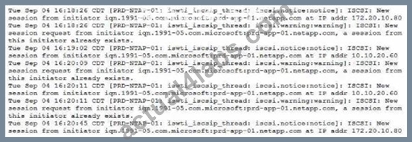
As shown in the exhibit, what is a cause of this flapping?
- A. A host with an IP address of 172.20.10.80 and a second host with an IP address of 10.10.20.60 are in different initiator groups.
- B. A host with an IP address of 172.20.10.80 and a second host with an IP address of 10.10.20.60 have the same IQN.
- C. A host with an IP address of 172.20.10.80 and a second host with an IP address of 10.10.20.60 are accessing the same LUN.
- D. A host with an IP address of 172.20.10.80 and a second IP address of 10.10.20.60 is accessing different LUNs.
Answer: B
Explanation:
IQN stands for iSCSI Qualified Name, which is a unique identifier for an iSCSI initiator or target1.
ONTAP uses IQN to authenticate and authorize iSCSI sessions2.
If two hosts have the same IQN, they will cause a conflict and ONTAP will reject the new session request from the second host3.
This will result in the host losing the connection to the iSCSI target and then reporting that the session was reestablished, as shown in the exhibit.
To avoid this problem, each host should have a unique IQN. Reference:
iSCSI Qualified Name (IQN) - NetApp
iSCSI authentication and authorization - NetApp
Troubleshooting iSCSI issues - NetApp
[Configuring iSCSI initiators - NetApp]
NEW QUESTION # 19
Your customer is running a NetApp AFF A800 system with NetAppONTAP 9.8 software and states that their
NS224 shelf is not showing with the correct shelf ID. You analyze the data and the shelf shows an
identification of "1.SHFHUXXXXXXXXXX."
What is the cause of the reported Issue?
- A. A new shelf was added to the controller.
- B. The shelf had a disk replaced too quickly.
- C. The shelf was cabled Incorrectly.
- D. The shelf has been power cycled.
Answer: A
NEW QUESTION # 20
A storage administrator reports that a monitoring toot is reporting that the storage controller reads between
90% to 93% CPU use. You run the sysstat -m command against thenode in question.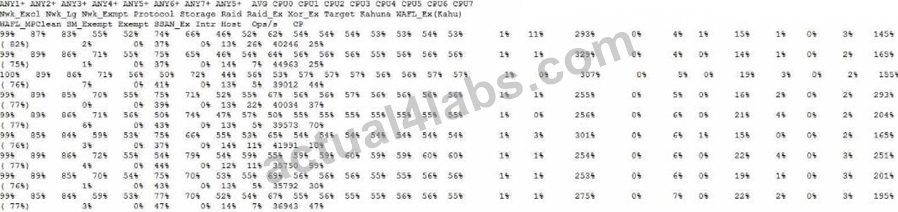
Referring to the exhibit, which statement is correct?
- A. The CPU Is not a first-order monitoring metric for ONTAP.
- B. You should immediately investigate further bygathering perfstat data and opening a support case.
- C. High network exempt use could be a problem.
- D. The customer should be advised to exclude certain workflows to reduce use.
Answer: B
NEW QUESTION # 21
A customer enabled NFSv4.0on an SVM and changed the client mount from NFSv3 to NFSv4. Afterwards,
the customer found that the directory owner was changed from root to nobody.
In this scenario, which statement is true?
- A. The export policy is not configured properly.
- B. The customer did not configure name services on the SVM.
- C. The ID mapping domains do not match between the client and server.
- D. The clients must be restarted to start using NFSv4.
Answer: A
NEW QUESTION # 22
Your customer wants to access a LUN on a FAS 8300 system from a VMware ESXi server through the FC
protocol. They already created a new SVM, volume. LUN, and igroup for this purpose. The customer reports
that the server's FC HBA port Is online, but the LUN does not show up.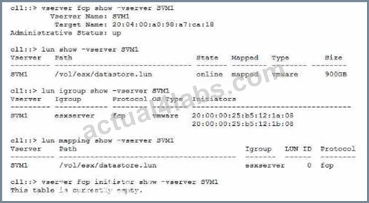
Referring to the exhibit, what is the reason for this problem?
- A. The LUN Is not mapped to the correct SCSI ID.
- B. The esxserver igroup contains incorrect IQNs.
- C. The zoning on the FC switches Is Incorrect.
- D. The FC service has not been configured on the SVM.
Answer: A
NEW QUESTION # 23
An administrator receives the following error message:
What are two causes for this error? (Choose two.)
- A. A disk is falling.
- B. There is excessive SATA HDD load.
- C. An SSD disk is performing garbage collection to create a dense data layout.
- D. There Is excessive SSD load causing the wear leveling to become unbalanced.
Answer: C,D
Explanation:
The error message "wafl.cp.toolong:error" indicates that a WAFL consistency point (CP) took longer than 30 seconds to complete. A CP is a process that flushes the data from the NVRAM buffer to the disk. A long CP can cause latency and performance issues for the system1 One possible cause for a long CP is excessive SSD load causing the wear leveling to become unbalanced. Wear leveling is a technique that distributes the write operations evenly across the SSD cells to extend the lifespan of the SSD. If some SSD cells are written more frequently than others, the wear leveling will become unbalanced and the SSD performance will degrade2 Another possible cause for a long CP is an SSD disk performing garbage collection to create a dense data layout. Garbage collection is a process that reclaims the space occupied by invalid or deleted data on the SSD. Garbage collection can improve the write performance and storage efficiency of the SSD, but it can also consume CPU and disk resources and cause long CPs3 A disk failing or being failed is not a likely cause for a long CP, because the system will automatically mark the disk as failed and remove it from the aggregate. The system will also initiate a disk reconstruction or a RAID scrub to restore the data protection and redundancy4 There is no evidence that the system has SATA HDDs, so there is no reason to assume that there is excessive SATA HDD load. Moreover, SATA HDDs are usually used for secondary or backup storage, not for primary or performance-sensitive workloads5 Reference:
1: Are long Consistency Points (wafl.cp.toolong) normal? - NetApp Knowledge Base 2: How to troubleshoot SSD performance issues - NetApp Knowledge Base 3: How to troubleshoot SSD garbage collection issues - NetApp Knowledge Base 4: How to troubleshoot disk failures and replacements - NetApp Knowledge Base 5: ONTAP 9 - Hardware Universe - The Open Group
NEW QUESTION # 24
Refer to the exhibit.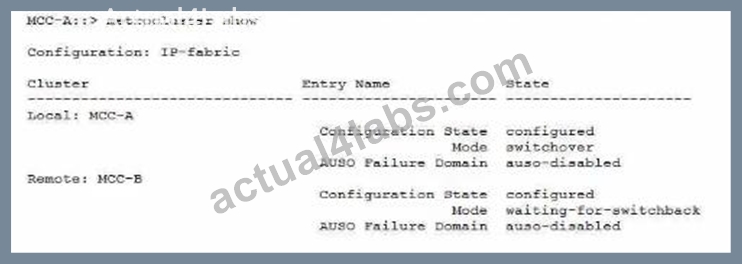
Referring to the exhibit, what do you need to do to return the MetroCluster to a normal state?
- A. Enter the storage failover giveback command on Site B.
- B. Enter the storage failover giveback command on Site A.
- C. Enter the metroclustor switchback command on Site B.
- D. Enter the metrocluster switchback command on Site A.
Answer: D
Explanation:
The question refers to a MetroCluster configuration, which is a disaster recovery solution that uses two physically separated, mirrored clusters1.
The exhibit shows a MetroCluster switchover scenario, where Site A has experienced a disaster and Site B has taken over the tasks of Site A2.
To return the MetroCluster to a normal state, you need to perform a MetroCluster switchback operation, which reverses the switchover and activates the original sync-source storage virtual machines (SVMs) on Site A3.
To perform a MetroCluster switchback, you need to enter the metrocluster switchback command on the cluster that was the source of the switchover, which is Site A in this case3.
The other options are not correct, because:
A) Entering the metrocluster switchback command on Site B will not work, as Site B is the destination of the switchover, not the source3.
C) Entering the storage failover giveback command on Site B will not work, as this command is used for local HA failover within a cluster, not for MetroCluster switchover between clusters4.
D) Entering the storage failover giveback command on Site A will not work, as this command is used for local HA failover within a cluster, not for MetroCluster switchover between clusters4. Reference:
Understanding MetroCluster data protection and disaster recovery - NetApp Perform IP MetroCluster switchover and switchback - NetApp Performing a switchback - NetApp High-availability configuration - NetApp
NEW QUESTION # 25
Your customer complains that u host will constantly report losing a connection to the iSCSl target and then
report that the session was reestablished.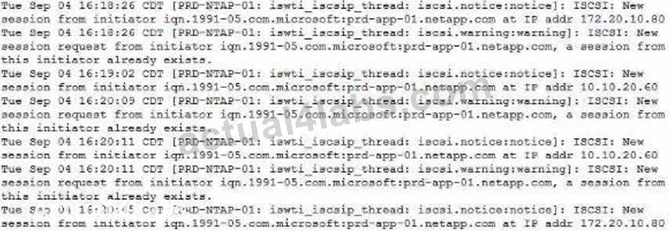
As shown in the exhibit, what is a cause of this flapping?
- A. A host with an IP address of 172.20.10.80 and a secondIP address of 10.10.20.60 is accessing different LUNs.
- B. A host with an IP address of 172.20.10.80 and a secondhost with an IP address of 10.10.20.60 are in
different initiator groups. - C. A host with an IP address of 172.20.10.80 and a second host with an IP address of 10.10.20.60 are
accessing the same LUN. - D. A host with an IP address of 172.20.10.80 and a second host with an IP address of 10.10.20.60 have the
same IQN.
Answer: C
NEW QUESTION # 26
After expanding a two-node AFF A300 cluster with two AFF A700 nodes, you observe latencies when data is
accessed indirectly. The system node run -node -command netstat command shows retransmits and packet
drops on the LIFs. The AFF A700 nodes with 40 Gbps and the AFF A300 connect with 10 Gbps to the cluster
interconnect. You are using Cisco Nexus 3132Q cluster interconnect switches. You just updated to ONTAP
9.8 software.
In this scenario, what is causing this problem?
- A. The 10 Gbps to 10 Gbps cluster Interconnect is creating a speed mismatch.
- B. There is an NXOS firmware mismatch, verify in the Interoperability Matrix (1MTJ for a supportedversion.
- C. The AFF A300 Is using an adapter card for the cluster Interconnect, but only onboard ports are supported.
- D. AFF A300 and AFF A700 node mixing Isnot supported in ONTAP 9.8 software.
Answer: A
NEW QUESTION # 27
You are attempting to connect a NetApp ONTAP cluster to a very complex network that requires LIFs to fail
over across subnets.
How would youaccomplish this task?
- A. Configure an equal number of UFs on each subnet.
- B. Configure VIP LIFs using BGP.
- C. Configure a I IF failover policy for each subnet inside a single broadcast domain.
- D. Configure VIP LIFs using OSPF.
Answer: B
NEW QUESTION # 28
A customer's storage administrator Informs you about the deactivated Automatic Switchover (AUSO) feature on their MetroCluster IP environment.
What Information would you tell your customer in this scenario?
- A. The AUSO feature cannot be activated due to a non-mirrored aggregate.
- B. The AUSO feature is not available in Metrocluster IP installations by design.
- C. A faulty link automatically deactivated the AUSO feature.
- D. This is a configuration failure, you can activate that feature for the customer.
Answer: B
Explanation:
The AUSO feature is a MetroCluster functionality that enables an automatic switchover to the surviving site in the event of a disaster that affects one site1.
The AUSO feature is only available in MetroCluster FC configurations, which use Fibre Channel (FC) switches and FC-to-SAS bridges to connect the nodes and disk shelves across sites1.
MetroCluster IP configurations, which use Ethernet switches and network adapters to connect the nodes and disk shelves across sites, do not support the AUSO feature2.
Instead, MetroCluster IP configurations use the ONTAP Mediator service, which is a software component that monitors the health and connectivity of the MetroCluster nodes and initiates a Mediator-assisted unplanned switchover when a disaster occurs3.
The Mediator-assisted unplanned switchover is similar to the AUSO feature, but it requires the ONTAP Mediator service to be configured and running on a separate host3.
Therefore, you would tell your customer that the AUSO feature is not available in MetroCluster IP installations by design, and that they need to use the ONTAP Mediator service instead for disaster recovery. Reference:
1: Understanding MetroCluster data protection and disaster recovery, ONTAP MetroCluster Documentation Center
2: Differences among the ONTAP MetroCluster configurations, ONTAP MetroCluster Documentation Center
3: Configure the ONTAP Mediator service from a MetroCluster IP configuration, ONTAP MetroCluster Documentation Center
NEW QUESTION # 29
A customer with an FC MetroCluster configuration that is running NetApp ONTAP 9.8 software experienced a site outage and wants to know why the MetroClusler configuration did not switch over to the other site.
What are two reasons for this problem? (Choose two.)
- A. An ISL link was not operating at 16Gbps.
- B. The site had unmirrored aggregates.
- C. There was a failed PSU in the switchover site.
- D. The ISLs were down between the sites.
Answer: B,D
Explanation:
A MetroCluster configuration requires the ISLs between the sites to be up and running for the switchover to occur. If the ISLs are down, the MetroCluster configuration cannot communicate with the other site and cannot perform the switchover. Additionally, a MetroCluster configuration requires all aggregates to be mirrored across the sites for data protection and availability. If a site has unmirrored aggregates, the switchover will fail because the data on those aggregates will not be accessible from the other site. Reference = Configuring the MetroCluster software in ONTAP, NetApp MetroCluster FC for ONTAP 9.8
NEW QUESTION # 30
Your customer installed the shelf firmware for their NS224 shelf over a week ago, and the firmware has
notupgraded on shelf 1 module B. The customer wants to know what the next steps would be to get the
firmware upgraded after verifying that the shelf firmware is indeed loaded onto the system.
Which step would you perform to complete the firmware upgrade?
- A. Reseat the disk in Bay 0.
- B. Reseat the NSM100 module.
- C. Power cycle the shelf.
- D. Reseat the PSU of the shelf.
Answer: C
NEW QUESTION # 31
A customer wants to connect a NetApp AFF A700 system to a 40GbE switch. The controllers have a 10/40G Ethernet card in slot 4 for this purpose. The link comes up fine on node 2, but it will not come up on node 1. You look at the AutoSupport data for the nodes in question and see the output shown in the exhibit.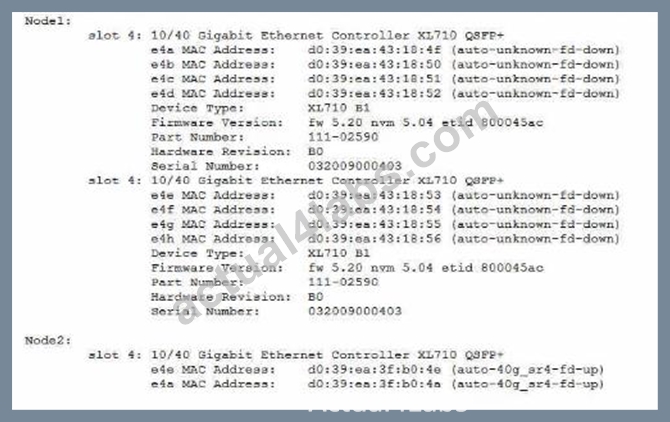
What is the cause of the customer's problem?
- A. The ports are configured for 4x10Gbit instead of 40Gbit.
- B. The cable is plugged in upside down.
- C. The port has an incorrect SFP inserted.
- D. The incorrect cable is used.
Answer: C
Explanation:
= The cause of the customer's problem is that the port has an incorrect SFP inserted. According to the AutoSupport data, the node 1 has a device type of XL710 BQ, which is a 40GbE adapter that requires a QSFP+ transceiver1. However, the part number of the adapter is 111-02590, which is a 10GbE adapter that requires a SFP+ transceiver2. This mismatch prevents the link from coming up on node 1. The customer should replace the adapter with the correct one or use a compatible transceiver for the existing adapter. Reference = 1: NetApp Hardware Universe - X1144A 2: NetApp Hardware Universe - X1147A
NEW QUESTION # 32
A customer reports that while Installing Windows updates on their external Vscan servers, clients couldnot
access any files on their CIF-S SVM. The problem disappeared after the update process was completed. The
customer wants to prevent this issue from happening during the next patch window.
In this scenario, what are two ways to accomplish this task? (Choose two.)
- A. Update the Vscan servers one at a time.
- B. Enable the -scan-mandatory flag in the Vscan policy.
- C. Disable the -scan-mandatory flag in the Vscan policy.
- D. Modify the CIFS shares to be continuously available (CA) shares.
Answer: B,D
NEW QUESTION # 33
You recently discovered the error message shown below in your ONTAP logs.
What should be your first action to correct this Issue?
- A. Determine the root cause behind the inconsistency before attempting any recovery procedure.
- B. Power cycle all the disk storage shelves that contain drives of the aggregate with the my_data_vol
volume. - C. Use the storage takeover command on the storage controller that contains my_data_vol.
- D. Use the wafliron command against my_data_vol to solve the inconsistency on the volume.
Answer: B
NEW QUESTION # 34
......
Reliable NetApp NCSE NS0-593 Dumps PDF Mar 13, 2026 Recently Updated Questions: https://www.actual4labs.com/NetworkAppliance/NS0-593-actual-exam-dumps.html
Pass Your Network Appliance NS0-593 Exam with Correct 62 Questions and Answers: https://drive.google.com/open?id=1YjnujWwH8r09rA5VpcZAy80MTzS1ZmGp