

Prepare for the Actual Nutanix Certified Professional NCP-MCA Exam Practice Materials Collection
Nutanix Certified Professional Certified Official Practice Test NCP-MCA - Apr-2026
For more info visit:
Nutanix NCP-MCA Exam Reference
NEW QUESTION # 13
As part of a security review, a blueprint developer has observed that sensitive information is being exposed through the Application Audit Logs, specifically in the output of Set-Variable tasks.
What step should the developer take?
- A. Blueprints should not be used to handle sensitive information.
- B. Use the built-in @@{jsonEncode(value)}@@ macro to store the value encrypted.
- C. When setting the variable in the task, use the form <variable>=secret=<value>.
- D. Variables should be created as secret variables so the value is masked in the output.
Answer: D
Explanation:
In Nutanix Self-Service (Calm), to protect sensitive data (such as passwords, keys, or personal tokens) from being displayed in plain text in the UI and Audit Logs, the developer must configure them asSecret Variables.
* Secret Configuration:When defining a variable in a Blueprint or Runbook, there is a specific checkbox option to mark the variable as "Secret" (often indicated by a lock icon).
* Behavior:Once a variable is marked as Secret, the Self-Service engine automaticallymasksthe value (replacing it with asterisks *****) in all Audit Log outputs, task details, and the user interface. It is passed securely to the script execution environment but is never echoed back to the console logs in readable form.
* Macros like jsonEncode (Option D) affect formatting, not security masking.
NEW QUESTION # 14
An administrator has noticed an increasing number of inactive VMS being left powered on within the environment over the course of OS migrations, using Playbooks, which two Actions should the administrator use to start documenting which VMS are marked as inactive to take future Automated actions on? (Choose two.)
- A. Send an Email with the Source Entity Name Parameter in the body.
- B. Trigger Playbook on Powered Off VM for all applicable VMS.
- C. Trigger Playbook on Alert with the Inactive VM Alert Policy.
- D. Assign the VMS to an Inactive:VM Category as an Action.
Answer: C,D
Explanation:
The administrator should assign the VMs to an Inactive:VM category as an action and trigger a playbook on alert with the Inactive VM alert policy. By doing this, they can create a custom category to group and identify the inactive VMs and use a custom alert policy to trigger a playbook that can perform automated actions on them, such as powering them off, deleting them, or sending notifications. This is based on the general practices in managing VMs in a multicloud environment, as well as the specific features and requirements of Nutanix X-Play and Nutanix Calm. References:
* How to create custom categories | Prism central | Nutanix Community
* Nutanix Certified Professional - Multicloud Automation (NCP-MCA) v6.5 Exam Blueprint Guide, Section 1: Describe and Differentiate Automation Concepts and Principles, Objective 1.4: List how to implement categories for the appropriate use cases
* Nutanix Multicloud Automation Administration (NMCAA) course, Module 3: Nutanix X-Play, Lesson
2: Nutanix X-Play Playbooks
* Nutanix Multicloud Automation Administration (NMCAA) course, Module 4: Nutanix Calm Governance, Lesson 2: Nutanix Calm Alerts
NEW QUESTION # 15
An administrator has been tasked with creating a multicloud, three-tier application using Calm. The application needs to consist of:
A MongoDB backend database
A NodeJS Javascript runtime environment
An NGINX webserver
The administrator has access to an AWS account, as well as a locally hosted Nutanix cluster. The three parts of the application should be fully redundant, and be able to tolerate either a cloud provider outage, or a local Nutanix cluster outage.
What is the most appropriate solution the administrator should choose in order to meet the requirements?
- A. Create a Calm blueprint with MongoDB, NodelS, and NGINX VMs running on Nutanix, then manually create three EC2 instances for MongoDB, NodeJS and NGINX in AWS running on US-WEST-1 and US-EAST-1.
- B. Create a Calm blueprint with MongoDB, NodelS, and NGINX VMs running on Nutanix, as well as MongoDB, NodeJS, and NGINX servers running in AWS on US-WEST-1 and US-EAST-1.
- C. Create a Calm blueprint with MongoDB, Node/S, and NGINX VMs running on Nutanix, as well as an NGINX server running in AWS on US-WEST-1 and US-EAST-1.
- D. Create a Calm blueprint with MongoDB, Node/S and NGINX VMs running on Nutanix, and a separate blueprint for MongoDB, NodeJS, and NGINX running in AWS on US-WEST-1 and US-EAST-1.
Answer: B
Explanation:
This solution meets the requirements of creating a multicloud, three-tier application using Calm. It ensures that each tier of the application has a redundant copy running on both Nutanix andAWS, and that the application can tolerate either a cloud provider outage or a local Nutanix cluster outage. The other options do not provide full redundancy for each tier, or require manual intervention to create the AWS instances. References: Nutanix Certified Professional - Multicloud Automation (NCP-MCA) Exam Blueprint Guide, page 10; Nutanix Multicloud Automation Administration (NMCAA) Course, Module 5: Blueprints.
NEW QUESTION # 16 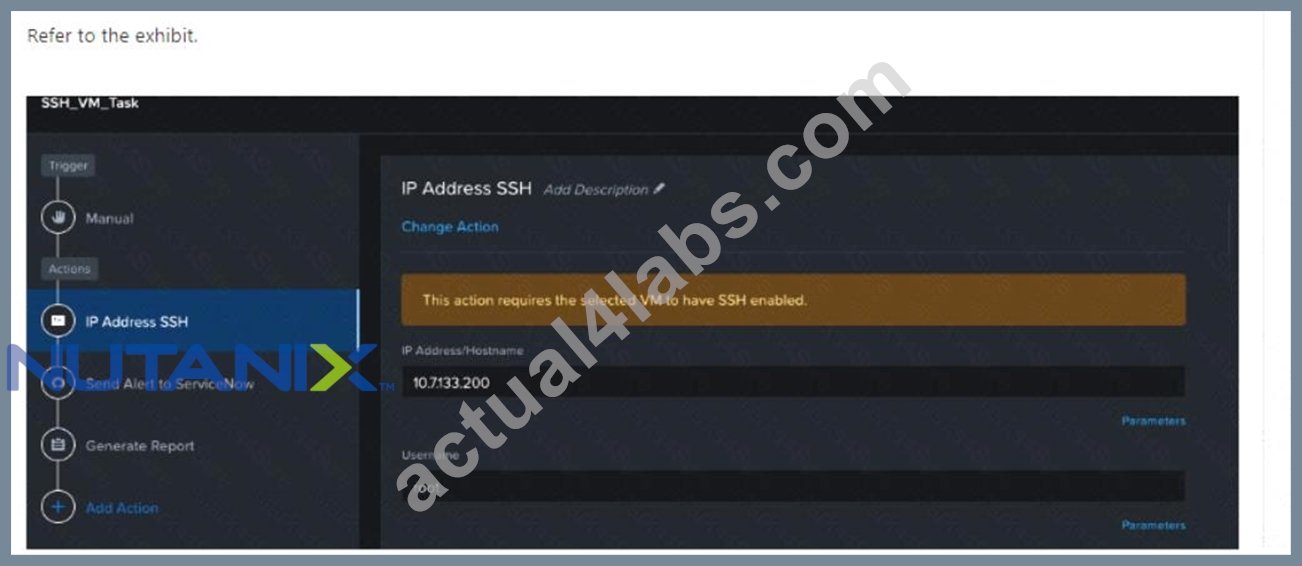
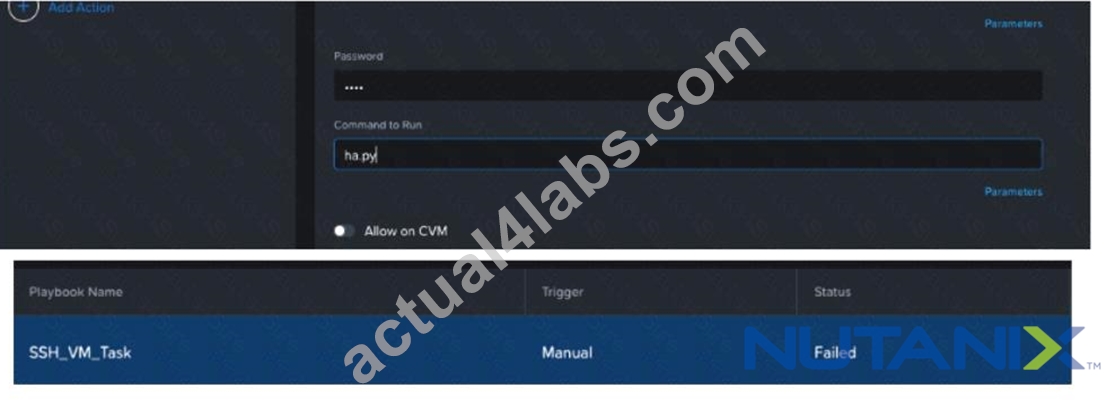
An administrator has run a multi-step Playbook. but sees the Failed status, as shown in the exhibit.
What could be causing the playbook to fail?
- A. puppet action has a timeout of 5 minutes.
- B. VM action has a timeout of 5 minutes.
- C. PowerShell action has a timeout of 5 minutes.
- D. IP Address SSH action has a timeout of 5 minutes.
Answer: D
Explanation:
The image shows a failed status for an SSH_VM_Task, which is manually triggered. Since the task involves SSH, it's likely that the IP Address SSH action has a timeout of 5 minutes, causing the playbook to fail if it cannot complete within this time frame. The IP Address SSH action is used to execute commands on a remote VM using SSH. It requires the IP address, username, password, and command to run as inputs. The timeout parameter specifies how long the action will wait for the command to finish before aborting. If the timeout is too short, the action may fail due to network latency, slow execution, or other factors. References:
* Nutanix Certified Professional - Multicloud Automation (NCP-MCA) 6.5 Exam, page 16, section
1.3.2.2: "Playbooks"
* [Nutanix University: NCP-MCA 6.5 Exam Prep - Playbooks], video 4: "Playbooks"
NEW QUESTION # 17
An administrator wants to automate the process of restarting a VM whenever it exceeds 90% CPU usage.
What steps should the administrator take to implement this automation?
- A. Configure a Project and set a policy to restart the VM when the CPU quota is exceeded.
- B. Create a Playbook with an alert-based trigger with an action to reboot the VM.
- C. Schedule a Runbook to restart all VMs daily and assign it to a project.
- D. Create a Playbook with a manual trigger with an action to reboot the VM.
Answer: B
Explanation:
To automate a remediation action (like restarting a VM) based on a specific performance threshold (like CPU usage > 90%), the administrator must useIntelligent Operations (X-Play)with an event-driven trigger.
* Alert-Based Trigger:The administrator first ensures there is an Alert Policy in Prism Central for "VM High CPU" configured with a threshold of 90%.
* Playbook Configuration:The administrator then creates a Playbook and selects theAlerttrigger (or Alerts Matching Criteriatrigger). They link this trigger to the specific CPU alert policy.
* Action:The administrator adds theVM Reboot(or Power Cycle) action to the Playbook.
* Result:As soon as the system detects the CPU exceeding 90%, the Alert fires, which immediately triggers the Playbook to reboot the VM without human intervention.
* Options A (Scheduled) and C (Manual) do not meet the requirement of "whenever it exceeds," which implies real-time reaction. Option B is incorrect because Project Quotas manage resource allocation limits, not runtime performance monitoring or remediation.
NEW QUESTION # 18
Which statement best describes Categories in Self-Service (formerly Calm)?
- A. Categories are the VM instances existing machines or bare-metal machines.
- B. Categories are metadata labels that are assigned to cloud resources.
- C. Categories are part of a templating language for Self-Service scripts.
- D. Categories provide a way to access the values of variables that are set on entities.
Answer: B
Explanation:
Categories in Self-Service (formerly Calm) are metadata labels that are assigned to cloud resources. These categories help organize and manage resources by tagging them with specific attributes, making it easier to apply policies and manage the infrastructure.
References:
* Nutanix Calm documentation on Using Categories.
* Nutanix Best Practices for Category Management.
NEW QUESTION # 19
A blueprint was developed for deploying a standard 3-tier hosting environment for a company's applications. The blueprint includes a load balancer, multiple web servers, a database server, and a small test application.
During testing of the blueprint, the application fails to connect to the database. The cause is found to be the database software is still installing when the application starts.
Which method most efficiently prevents the application from starting before the database?
- A. Create a loop to retry connection
- B. Use a sleep statement in a start script
- C. Use a local install instead of downloading
- D. Create a service dependency
Answer: D
Explanation:
A service dependency is a feature of Nutanix Calm that allows you to define the order of execution and the conditions for starting and stopping services in a blueprint. By creating a service dependency between the application and the database, you can ensure that the application will not start until the database is fully installed and ready. This avoids the need for manual intervention or inefficient workarounds like loops or sleep statements. Reference: Nutanix Multicloud Automation Administration (NMCAA), page 41; Nutanix Certified Professional - Multicloud Automation (NCP-MCA), section 2.
NEW QUESTION # 20
An administrator wants to create a blueprint for a development environment that uses an existing on-premise GitLab repository. Every new development environment requires a new user in the GitLab repo.
Which two tasks should the administrator perform within a Calm blueprint to automate this process? (Choose two.)
- A. Create a task script in order to login with ssh to GitLab and create a random user and password.
- B. Add a task within the service in order to ask for user and password at runtime.
- C. Create runtime-editable variables for user and password in the blueprint.
- D. Create an HTTP pre-create task to create the user in GitLab via REST API.
Answer: C,D
Explanation:
To automate the creation of a new user in GitLab for every new development environment, the administrator should perform the following tasks within a Calm blueprint:
* Create an HTTP pre-create task to create the user in GitLab via REST API. This task will send an HTTP request to the GitLab server with the user information and credentials, and receive a response with the user ID and status. The administrator can use the response to verify the user creation and store the user ID as a variable for later use.
* Create runtime-editable variables for user and password in the blueprint. These variables will allow the administrator to specify the user name and password for the new GitLab user at the time of launching the blueprint. The variables can be passed as parameters to the HTTP pre-create task and used in the REST API call.
* The other two options are not correct because:
* Adding a task within the service to ask for user and password at runtime is redundant and unnecessary, as the runtime-editable variables can already provide this functionality.
* Creating a task script to login with ssh to GitLab and create a random user and password is not a good practice, as it exposes the GitLab server to security risks and does not use the REST API that GitLab provides for user management. References:
* Nutanix Certified Professional - Multicloud Automation (NCP-MCA) 6.5 Exam, page 17
* Nutanix Calm User Guide, section "HTTP Task"
* GitLab API Documentation, section "Create user"
NEW QUESTION # 21
An Application team has provided an administrator the following high level requirements for infrastructure they require:
5 Application VMs
2 Database VMs
2 Web VMs
Which two pieces of information are needed, at a minimum, to effectively automate the scaling of the environment? (Choose two.)
- A. If the application needs to be highly available
- B. Steady state resource utilization
- C. SLA uptime of the application
- D. Expected resource utilization under load
Answer: C,D
NEW QUESTION # 22
An administrator wants to execute a package install task to create an application using NDB.
The following method is currently used to perform this task manually: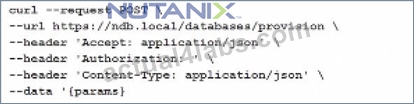
How can the administrator ensure that checks can be implemented in a single task?
- A. Run a eScript task
- B. Run a playbook action
- C. Run a create action
- D. Run a Pre-create task
Answer: A
Explanation:
To ensure that checks can be implemented in a single task while creating an application using NDB (Nutanix Database Service), the administrator should run an eScript task. eScript tasks allow for more complex scripting and logic to be executed, including performing checks, handling conditions, and interacting with APIs.
Reference:
Nutanix Calm documentation on eScript Tasks.
Nutanix Best Practices for Automating Database Management.
NEW QUESTION # 23
Which project enables a project administrator or user to view and manage VMs and applications of other users in the same project?
- A. Project Environments
- B. Allow Collaboration
- C. Users and Groups
- D. Quota Policy
Answer: B
Explanation:
The "Allow Collaboration" setting in a project enables a project administrator or user to view and manage VMs and applications of other users within the same project. This setting fosters collaboration and sharing of resources among users who are part of the same project.
Reference:
Nutanix Calm documentation on Project Collaboration.
Nutanix Best Practices for Managing Projects.
NEW QUESTION # 24
An administrator must create a VM with a specific IP address and provision it into a security group before it's powered on.
What type of tasks would allow them to accomplish this?
- A. VM power-on and Post-delete
- B. Post-delete and Pre-create
- C. Pre-create and Post-create
- D. While-loop and Post-create
Answer: C
Explanation:
To satisfy specific ordering requirements around IP assignment (before VM existence) and Security Group assignment (after VM existence but before use), the administrator usesPre-createandPost-createtasks.
* Pre-Create Task (IP Address):This task executesbeforethe VM provisioning call is made to the provider. The developer uses this phase (e.g., an HTTP task or Script) to request a specific IP from an external IPAM solution. The IP is stored in a variable and passed to the VM configuration.
* VM Provisioning:The VM is created (using the IP from step 1) but is configured in the blueprint to stay in aPowered Offstate initially.
* Post-Create Task (Security Group):This task executesimmediately afterthe VM resource is created (so the VM UUID/NIC exists) but before the application logic starts. The developer uses this phase to make an API call (e.g., to Flow or NSX) to place the VM into the required Security Group.
* Power On:A subsequent task (or manual action) powers on the VM, ensuring it boots up with the correct IP and within the correct security boundary.
Option C is the only combination that covers both the "Before Creation" and "After Creation" phases required.
NEW QUESTION # 25
A company wants to ensure that all developers are able to request new development environments on demand by using ServiceNow.
The administrator notices that even though developers create new environments, they rarely remove these environments when moving on to new assignments. Today, the administrator has gone into Prism Central to check when the VM was created, in order to reach out to the developer and ask if it can be deleted. The administrator has accidentally deleted the wrong VM in the past.
Which two methods can the administrator use to automate this task to avoid deleting the incorrect VMs? (Choose two.)
- A. Create a playbook REST API trigger to delete the VM from a ServiceNow approval flow.
- B. Create a playbook REST API action to delete the VM from a ServiceNow approval flow.
- C. Create a playbook webhook action to delete the VM from a ServiceNow approval flow.
- D. Create a playbook webhook trigger to delete the VM from a ServiceNow approval flow.
Answer: B,C
Explanation:
A playbook REST API action allows the administrator to send an HTTP request to a specified endpoint, such as the Prism Central API, to perform an operation, such as deleting a VM. A playbook webhook action allows the administrator to send a payload to a specified URL, such as a ServiceNow webhook, to trigger an event, such as an approval flow. Both of these actions can be used to automate the deletion of VMs from a ServiceNow approval flow, where the developers can request and confirm the removal of their environments. A playbook webhook trigger and a playbook REST API trigger are not valid options, as they are used to initiate a playbook based on an external event, not to perform an action within a playbook. Reference: Nutanix Certified Professional - Multicloud Automation (NCP-MCA) 6.5 Exam Blueprint Guide, page 10; Nutanix Certified Professional - Multicloud Automation (NCP-MCA), section 4; NCP-MCA Exam Dumps - Nutanix Certified Professional - Multicloud ..., question 70.
NEW QUESTION # 26
Refer to the exhibit.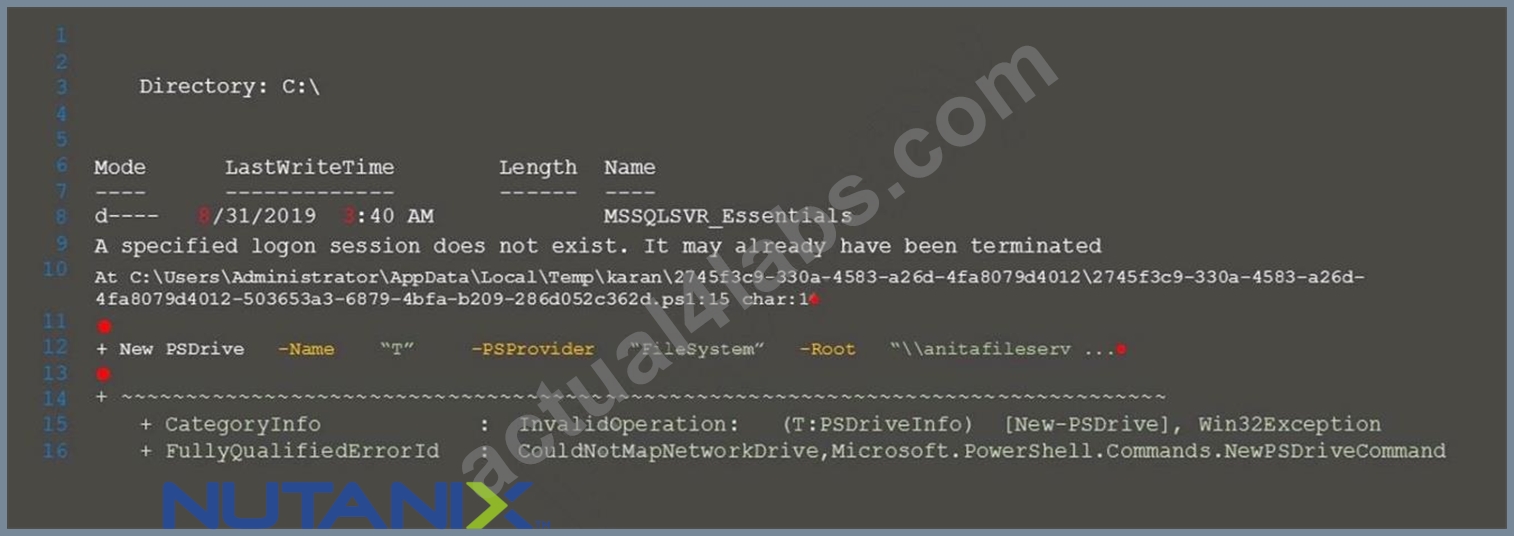
Calm encountered the error shown in the exhibit when importing a script that maps a network drive.
Upon further investigation, the Calm administrator was unable to run the script manually on a VM and discovered that elevated permissions were needed.
Which command should the administrator add to the script?
- A. Enable-WSManCredSSP -Role Client
- B. Enable-WSManCredSSP -Role Server -Force
- C. Enable-WSManCredSSP -Role Server
- D. Disable-WSManCredSSP -Role Server -Force
Answer: A
Explanation:
The error message indicates that the script failed to authenticate to the remote server using CredSSP. CredSSP is a security mechanism that allows a client to delegate its credentials to a remote server for authentication. To use CredSSP, both the client and the server need to enable it and configure the role and the trusted hosts. The command Enable-WSManCredSSP -Role Client enables CredSSP on the client side and specifies the remote server as a trusted host. This command should be added to the script before invoking the Invoke-Command cmdlet that runs the script block on the remote server. The other commands are either irrelevant or incorrect for this scenario. References: Nutanix Calm: PowerShell Scripts - Read the Docs and Enable-WSManCredSSP (Microsoft.PowerShell.Management) - PowerShell | Microsoft Docs.
NEW QUESTION # 27
Within a Calm blueprint, which two actions can an administrator apply to a Service under the Guest Customization section? (Choose two.)
- A. Apply a Cloudinit Script
- B. Modify the base OS image
- C. Apply a Sysprep file
- D. Choose UEFI or Legacy BIOS
Answer: A,C
Explanation:
Within a Calm blueprint, an administrator can apply two actions to a Service under the Guest Customization section: Apply a Cloudinit Script and Apply a Sysprep file. These actions allow the administrator to customize the configuration and behavior of the virtual machines that are provisioned from the blueprint. A Cloudinit Script is a set of commands or scripts that run on Linux-based virtual machines during the boot process. A Sysprep file is a configuration file that specifies the Windows settings and options for the virtual machines. These actions can be used to perform tasks such as setting the hostname, network configuration, user accounts, software installation, and more. Reference:
Nutanix Certified Professional - Multicloud Automation (NCP-MCA) v6.5, Section 2 - Deploy and Configure Nutanix Calm and Related Components, page 3 Nutanix Multicloud Automation Administration (NMCAA), Module 2 - Nutanix Calm, Lesson 2.2 - Blueprint Management, page 9 Nutanix Calm User Guide, Blueprint, Guest Customization
NEW QUESTION # 28 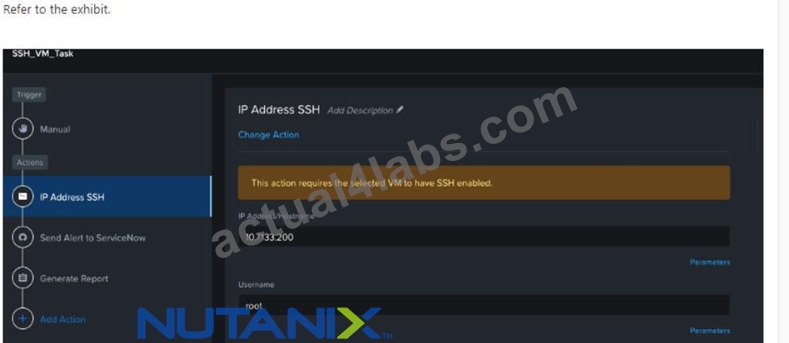
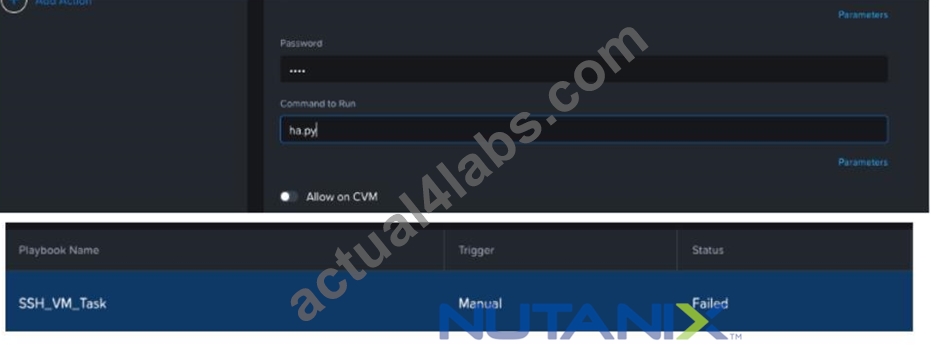
An administrator has run a multi-step Playbook. but sees the Failed status, as shown in the exhibit.
What could be causing the playbook to fail?
- A. puppet action has a timeout of 5 minutes.
- B. VM action has a timeout of 5 minutes.
- C. PowerShell action has a timeout of 5 minutes.
- D. IP Address SSH action has a timeout of 5 minutes.
Answer: D
Explanation:
The image shows a failed status for an SSH_VM_Task, which is manually triggered. Since the task involves SSH, it's likely that the IP Address SSH action has a timeout of 5 minutes, causing the playbook to fail if it cannot complete within this time frame. The IP Address SSH action is used to execute commands on a remote VM using SSH. It requires the IP address, username, password, and command to run as inputs. The timeout parameter specifies how long the action will wait for the command to finish before aborting. If the timeout is too short, the action may fail due to network latency, slow execution, or other factors. References:
* Nutanix Certified Professional - Multicloud Automation (NCP-MCA) 6.5 Exam, page 16, section
1.3.2.2: "Playbooks"
* [Nutanix University: NCP-MCA 6.5 Exam Prep - Playbooks], video 4: "Playbooks"
NEW QUESTION # 29
Which two groups of operations can a Prism Admin or Super Admin role perform? (Choose two.)
- A. Create, read, automate, delete, enable, and run playbooks
- B. Create, read, update, or delete an action template in the action gallery
- C. Create, read, update, delete, enable, and run playbooks
- D. Create, read, automate, or delete an action template in the action gallery
Answer: B,C
Explanation:
A Prism Admin or Super Admin role can perform the following operations related to X-Play and Nutanix Calm12:
* Create, read, update, or delete an action template in the action gallery
* Create, read, update, delete, enable, and run playbooks
* Create, read, update, delete, enable, and run blueprints and runbooks
* Manage applications and projects
* Configure endpoints and plug-ins
* Access the library and categories Option A is incorrect because the action gallery does not support automation of action templates. Option C is incorrect because only a Prism Admin or Super Admin role can enable and run playbooks, not a Prism User role3. References:
* Nutanix Certified Professional - Multicloud Automation (NCP-MCA) v6.5
* Nutanix Multicloud Automation Administration (NMCAA)
* Prism user permissions - what are the options?
NEW QUESTION # 30
Prism Central reporting indicates that there are multiple memory-constrained VMs in multiple clusters. The target VMs have Memory Hot Add enabled.
Using X-Play, in what order should the Playbook actions be added to ensure the VMs are properly remediated?
- A. VM add Memory, Take a VM Snapshot, Resolve Alert
- B. Power off VM, Take a VM Snapshot, VM add Memory, Resolve Alert
- C. Take a VM Snapshot, VM add Memory, Resolve Alert
- D. Take a VM Snapshot, Power Off VM, VM Add Memory, Resolve Alert, Power on VM
Answer: C
Explanation:
To ensure the VMs are properly remediated, the Playbook actions should be added in the following order:
Take a VM Snapshot, VM add Memory, Resolve Alert. This is because Memory Hot Add allows the administrator to increase the memory allocation of a running VM without powering it off. Taking a VM snapshot before adding memory provides a backup point in case of any issues. Resolving the alert after adding memory clears the notification and updates the status of the VM. Powering off the VM is not necessary and may cause downtime or disruption to the applications running on the VM. References: Nutanix Certified Professional - Multicloud Automation (NCP-MCA) Exam Blueprint Guide, page 11; Nutanix Calm SaaS User Guide, section 4.2.3.
NEW QUESTION # 31
Refer to the exhibit.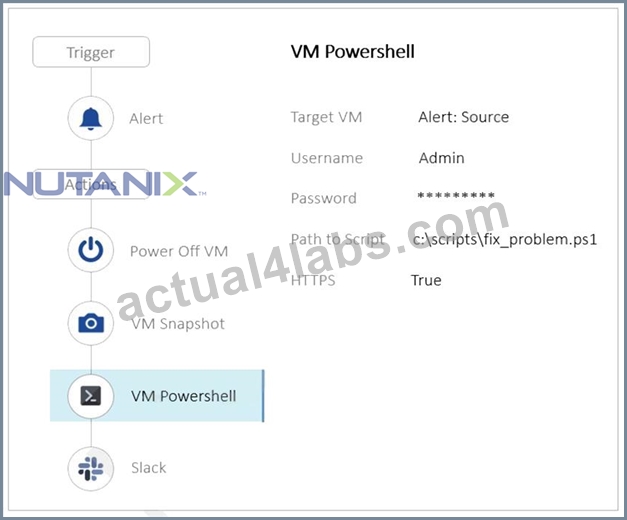
The Playbook is designed to execute a script, in order to fix a known problem in the application. However, it keeps failing.
Why is this Playbook continuing to fail?
- A. Not enough storage space in order to take a snapshot.
- B. The Playbook actions are in the wrong order.
- C. The script is incorrect.
- D. Slack configuration should be reviewed.
Answer: B
Explanation:
In the context of Nutanix Multicloud Automation (NCP-MCA), the order of actions in a playbook is crucial for its successful execution. In this case, the playbook is designed to execute a script to fix a known problem in an application but keeps failing because it attempts to power off the VM and take a snapshot before executing the script. The correct order should be to execute the script first, then power off the VM if necessary, and finally take a snapshot.
* Nutanix Certified Professional - Multicloud Automation (NCP-MCA) 6.5 Exam: This is the official exam blueprint guide that covers the objectives, topics, and skills required for the certification. It also provides some sample questions and answers.
* Nutanix Certified Professional - Multicloud Automation (NCP-MCA) Exam Blueprint Guide: This is another version of the exam blueprint guide that has similar content as the previous one.
* Free Questions for NCP-MCA by certscare - p2pexams.com: This is a PDF document that contains 11 questions and answers for the NCP-MCA exam. The question you asked is one of them, and the answer is the same as mine.
NEW QUESTION # 32
......
The NCP-MCA exam covers a range of topics, including Nutanix Calm, which is Nutanix's automation and orchestration platform. Candidates will be tested on their ability to use Calm to automate application deployment, scaling, and management across multiple clouds. NCP-MCA exam also covers Nutanix Era, which is a database-as-a-service platform designed to simplify database provisioning, management, and lifecycle operations. Other topics covered by the exam include Nutanix Xi Leap, which is a disaster recovery and business continuity solution, and Nutanix Files, which is a software-defined file storage solution.
Earning the NCP-MCA certification demonstrates to employers and colleagues that an individual has the knowledge and skills necessary to manage and automate IT operations across multicloud environments. Nutanix Certified Professional - Multicloud Automation (NCP-MCA 6.10) certification is particularly valuable for IT professionals who work in organizations that use Nutanix technology to manage their IT infrastructure. The NCP-MCA certification also provides a pathway for IT professionals to advance their careers by demonstrating their expertise in multicloud automation.
Ace Nutanix NCP-MCA Certification with Actual Questions Apr 22, 2026 Updated: https://www.actual4labs.com/Nutanix/NCP-MCA-actual-exam-dumps.html
2026 The Most Effective NCP-MCA with 102 Questions Answers: https://drive.google.com/open?id=13xNG0-1GAbCLidPAC34_mWs9rRWWSObu